
Amazon Search Engine Optimisation: A Practical Guide for Sellers
Amazon search engine optimisation (SEO) is the process of improving a product listing so it is more likely to appear in relevant Amazon search results and persuade shoppers to buy. For sellers on Amazon.co.uk, effective optimisation can make products easier to find, explain their benefits clearly and support stronger sales over time.
Amazon’s search system is designed to help customers find products they are likely to purchase. The exact ranking factors and their weightings are not public, and they can change. However, sellers can focus on two broad priorities: making a listing relevant to a shopper’s search and giving that shopper a useful, persuasive buying experience.
How Amazon SEO differs from traditional SEO
Traditional search engines often help people find information across the web. Amazon is primarily a marketplace where many shoppers arrive ready to compare or buy products. As a result, product relevance matters, but so does how well a listing performs once it appears.
A well-optimised listing should use language customers search for while also presenting accurate information, strong images and clear product benefits. Keyword use alone is unlikely to make up for a poor customer experience, an uncompetitive offer or limited availability.
Research keywords before writing your listing
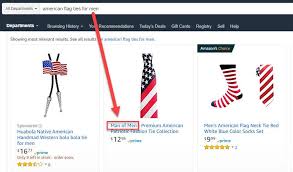
Keyword research helps identify the words and phrases customers use when looking for products. Start with the product’s core name, then consider its type, features, intended use, material, size and compatibility. For example, a listing for a reusable water bottle might need to cover relevant phrases such as “stainless steel water bottle”, “insulated bottle” or “leakproof drinks bottle”, where those descriptions are accurate.
Useful sources of insight can include Amazon’s search suggestions, category browsing, customer questions and reviews, and keyword research tools. Look for terms that are both relevant and specific. Broad terms may attract more searches, but more precise phrases can better match a particular product and a shopper’s needs.
Before using a keyword, check that it genuinely describes the item. Irrelevant or misleading terms can frustrate customers and may breach Amazon’s policies.
Write a clear, informative product title
The title is one of the most prominent parts of a product listing. It should help shoppers quickly understand what the product is and whether it is suitable for them. Include the most important identifying details, such as the brand, product type, key feature, size or quantity, where relevant.
Keep the title readable. Avoid repeating the same phrase, using excessive capitalisation or adding promotional claims that do not belong in the title. Amazon’s style requirements can vary by product category, so check the current rules for the category before publishing.
Make bullet points useful to shoppers
Bullet points give customers a quick way to understand the product’s main features and benefits. Use them to answer practical questions, not simply to repeat keywords. Depending on the product, useful details might include:
- What the product is made from and how it is constructed
- Its dimensions, capacity, quantity or included accessories
- How it works and how to use or care for it
- Which models, devices or situations it is compatible with
- Any important limitations or requirements
Be specific and accurate. If a feature could be misunderstood, explain it plainly. Clear information can help customers make informed decisions and reduce avoidable returns.
Use the description and A+ Content effectively
The product description provides space to expand on the information in the title and bullet points. Organise it so that shoppers can scan it easily, and focus on product details that support the buying decision. Avoid unsupported health, safety or performance claims.
Eligible sellers may also be able to use A+ Content to add enhanced images, comparison charts and formatted product information. This content can help explain more complex products and communicate a brand’s story. It should complement the listing rather than repeat the same text without adding useful detail.
Choose strong product images
Images help shoppers understand what they are buying, particularly when they cannot handle the product in person. Use a clear main image that meets Amazon’s image requirements, followed by additional images that show the product from different angles and in relevant contexts.
Depending on the product, useful supporting images may show scale, dimensions, included components, materials or instructions for use. Keep text and graphic overlays within the applicable image rules, and make sure every image accurately represents the product being sold.
Complete relevant product details and search terms
Amazon provides fields for product attributes and, in many categories, additional search terms. Complete all relevant attributes, such as colour, size, material and compatibility. These details can help customers filter results and clarify what the product offers.
Use backend search-term fields for relevant terms that are not already covered naturally in the visible listing. Follow Amazon’s current guidance on character limits and formatting. Do not use competitor brand names, unrelated phrases or claims that could mislead shoppers. Repeating the same words excessively is generally less useful than providing a concise range of relevant terms.
Support listing performance with a competitive offer
Search visibility is only part of the picture. Customers also consider price, delivery options, availability and seller information. Review the market regularly and make sure the offer is competitive without setting a price that undermines the business. Keep stock levels healthy and provide accurate delivery information.
For eligible products, fulfilment options such as Fulfilment by Amazon may affect the delivery experience available to customers. Compare the costs and operational requirements before choosing a fulfilment method.
Build reviews in line with Amazon’s policies
Customer reviews can help shoppers assess a product, but review activity must follow Amazon’s rules. Never buy reviews, offer incentives in exchange for positive feedback or ask customers to remove or change an honest review. Use the tools Amazon provides to request reviews where available, and respond professionally to customer concerns through the appropriate channels.
Pay attention to recurring feedback. If customers repeatedly mention unclear instructions, a missing component or a mismatch between the listing and the product, address the underlying issue and update the listing where necessary.
Use advertising to complement organic optimisation
Amazon Ads can help a product reach shoppers through sponsored placements. Advertising is not a substitute for a clear, accurate listing, but it can support product discovery and provide useful performance data. Start with a defined budget, monitor search-term reports and assess whether clicks are leading to sales at a sustainable cost.
Use advertising insights carefully. A search term that generates clicks is not automatically a good target if it attracts the wrong audience or fails to convert. Refine campaigns over time and make sure the listing matches the expectations created by the ad.
Measure results and improve steadily
Amazon SEO is an ongoing process rather than a one-off task. Track relevant measures, such as impressions, click-through rate, conversion rate, sales, advertising costs and return rates. The reports available will depend on the seller account and tools being used.
When performance changes, investigate possible causes instead of changing everything at once. Seasonality, stock availability, competition, pricing and listing edits may all play a part. Test improvements methodically and give changes enough time to produce meaningful data.
A practical Amazon SEO checklist
- Research relevant customer search terms for the product and category.
- Write a readable title that identifies the product and its key details.
- Use bullet points to explain genuine features and customer benefits.
- Add accurate product descriptions, attributes and backend search terms.
- Upload clear images that follow Amazon’s current requirements.
- Check price, stock, fulfilment and delivery information regularly.
- Follow Amazon’s rules when requesting and managing reviews.
- Monitor performance and make evidence-based improvements.
Conclusion
Successful Amazon search engine optimisation brings together relevant keywords, accurate product information and a strong customer experience. Sellers who understand what shoppers need, present products clearly and review performance regularly are better placed to improve discoverability and support sales. As Amazon’s requirements and marketplace conditions change, listings should be checked and updated to remain accurate, useful and compliant.
5 Tips to Improve Your Amazon Search Rankings
- Research relevant keywords using Amazon search suggestions.
- Place your main keywords naturally in the product title.
- Use clear bullet points to describe key benefits and features.
- Add relevant search terms in the backend keyword fields.
- Improve reviews and conversion rates with accurate listings and good service.
Research relevant keywords using Amazon search suggestions.
Research relevant keywords using Amazon’s search suggestions to discover the phrases shoppers actually type when looking for products like yours. Start entering a product name or key feature in the Amazon search bar and note the suggested completions, then check that each phrase accurately describes your item before using it in your listing. These suggestions can reveal specific customer needs and useful long-tail keywords, helping you write clearer titles and product details without relying on guesswork or adding irrelevant terms.
Place your main keywords naturally in the product title.
Place your main keywords naturally in the product title so shoppers and Amazon can quickly understand what you’re selling. Include the most relevant search terms alongside essential details such as the brand, product type, size or key feature, but keep the wording clear and easy to read. Avoid keyword stuffing or repeating phrases, as this can make the title look unprofessional and harder for customers to scan.
Use clear bullet points to describe key benefits and features.
Use clear, concise bullet points to highlight your product’s most important features and benefits. Explain what it does, what it is made from, its size or compatibility, and how it can help the customer. Put the most useful information first, keep each point easy to scan, and make sure every claim is accurate. Well-written bullet points help shoppers quickly decide whether the product meets their needs while naturally including relevant search terms.
Add relevant search terms in the backend keyword fields.
Add relevant search terms in the backend keyword fields to help Amazon understand which searches your product may suit. Include useful synonyms, alternative names and related phrases that are not already covered naturally in the visible listing, while keeping every term accurate and relevant. Follow Amazon’s current guidance on field limits and formatting, and avoid repeating keywords unnecessarily or adding competitor brands, misleading claims or unrelated terms.
Improve reviews and conversion rates with accurate listings and good service.
Improve reviews and conversion rates by making sure your listing accurately reflects the product, including its features, size, materials and any limitations. Clear descriptions and images help customers make informed decisions and reduce the risk of disappointment or returns. Pair this with reliable delivery and responsive customer service, so buyers know what to expect and feel supported if they need help. Satisfied customers are more likely to leave positive, honest reviews and recommend your product.
- amazon
- amazon keyword tool
- amazon optimization
- amazon search
- amazon seo service
- engine
- engine optimization
- keyword optimization
- keyword optimizer
- keyword search tool
- keyword tool
- keyword tools
- list
- product search tool
- search
- search engine optimization
- search engine optimization companies
- search engine optimization company
- search engine optimization service
- search engines
- seo
- seo companies
- seo company
- seo services